
It started with a biography. Then we saw the HTML tab.
I was updating an artist biography in Deezer for Creators when I noticed two options sitting above the editor: Rich Text and HTML. I work with websites and design, so naturally the HTML tab caught my attention. Maybe it would let me give the biography a distinct layout, adjust the typography, use some brand color, or at least make it look less like everybody else's. I wasn't trying to rebuild Deezer. I just wanted to give a biography a little personality.
Deezer officially offers artist profile management, including biography updates. That's real functionality, and it's useful. In its Deezer for Creators launch announcement, Deezer confirms that web users can update their biography and profile picture. DistroKid's guide to claiming a Deezer artist profile also identifies biography editing as a supported action. But neither document explains which HTML tags or CSS properties the biography editor accepts. That's the missing piece: the HTML option is visible, but its boundaries aren't clear.
The actual interface, not a mockup.
Here are the two views from our Deezer for Creators session. They show why the HTML option caught our attention, and how the same biography appears in the visual and source editors. Select either screenshot to open the full-size original.
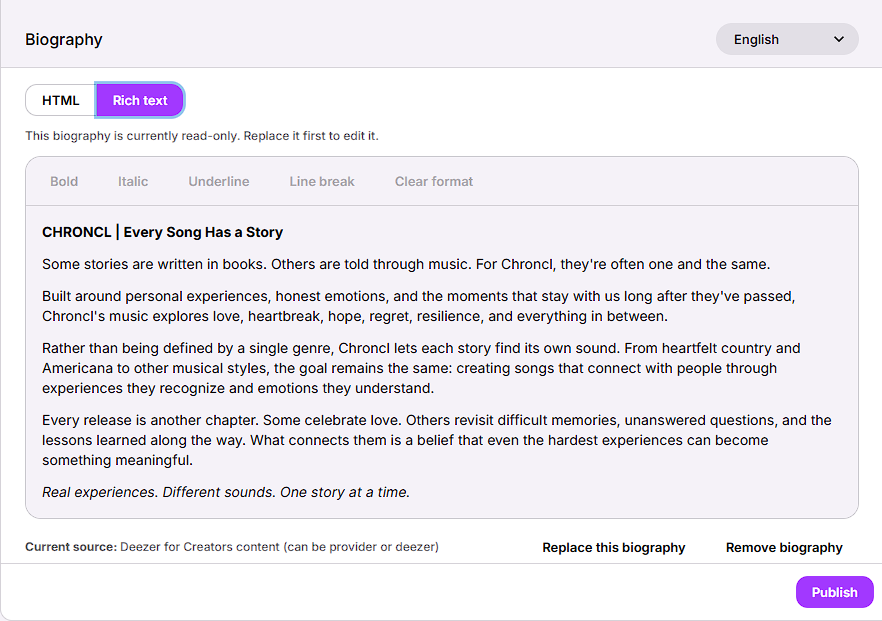
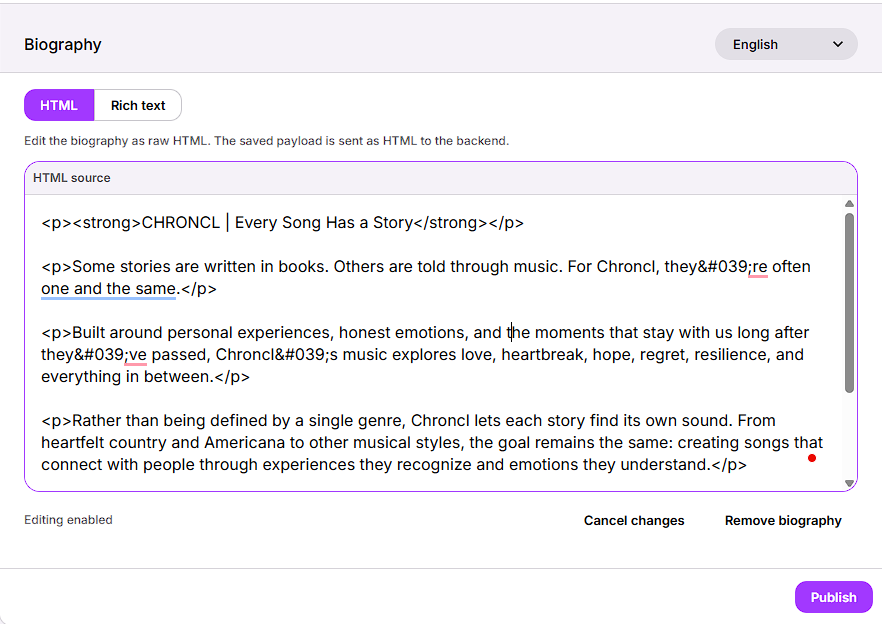
<p> and <strong> tags. Useful if you need to inspect source; not by itself evidence that custom visual styling is supported.These screenshots document the two editing interfaces after our formatting experiment. They do not depict the separate purple-color test. We report that live-test result from our firsthand check, not from these images.
So we tested it ourselves. We pasted a few paragraphs containing bold and italic text, plus a short sentence with a purple inline color style. In the Rich Text editor, the paragraphs and ordinary formatting appeared, but the purple didn't. Then we took the test further and checked the published artist profile. Same outcome: the custom purple styling did not survive publication. That's an observed result, not a guess based only on the editor preview.
We haven't determined whether Deezer removes the style when saving, sanitizes it during processing, or simply declines to render it on the listener-facing page. We also haven't tested every possible heading, link, list, or HTML attribute. Our finding is narrower and firmer: this custom color didn't work on the live profile. Which raises the next question.
What, exactly, was the advantage of doing all that typing?
Bold, italics, and paragraphs were usable in our test. Custom purple text styling did not display on the live profile. We confirmed the result; we did not identify the exact processing step that removed or suppressed it.
<strong>This is bold.</strong>Enter the opening and closing tags, then confirm the editor renders them.
Select your text, click Bold, move on with your life.
Congratulations, you've unlocked difficulty mode.
It's not that writing HTML is inherently bad. Developers use it constantly. But for something as simple as bolding a sentence, the Rich Text button is the better tool for most people. You can type your biography in normal language, highlight the words you want, and press a button. No angle brackets, no closing tags, no chance of formatting your entire life story in italics because you forgot one character.
Now put yourself in the position of an artist who doesn't write code. They see an HTML tab, which looks more advanced, and might reasonably assume it unlocks more freedom. If they try it and the only benefits they can identify are things the toolbar already offers, the product has created confusion instead of empowerment. And yes, the HTML mode might support extra structure we haven't confirmed. That doesn't solve the communication problem. It makes the case for explaining those capabilities even stronger.
HTML is not a magic "design my profile" button.
Before anybody declares war in the comments, let's get the technical part straight. MDN's HTML documentation explains that HTML describes the structure and meaning of web content, while its CSS styling guide covers visual presentation such as colors, typography, and layout. You can put styling in an HTML attribute, but that doesn't force another application to preserve it. Our published Deezer test showed exactly that limitation for the purple text color we tried.
A service displaying artist biographies also has good reasons to limit what people can inject into those pages. The OWASP Cross-Site Scripting Prevention Cheat Sheet recommends HTML sanitization when users can author formatted content, because unsafe markup can create cross-site scripting risks. A public music platform probably doesn't want somebody turning a biography into a custom JavaScript playground. Fair enough. Security and a consistent interface matter. And to be clear, we're not claiming to have identified Deezer's exact filtering implementation.
But that's also why a source editor should communicate its rules. If certain tags are allowed and others aren't, say so. If inline CSS is ignored, explain that. If the source mode is for editing basic semantic markup rather than custom styling, call it what it is. You don't have to hand everyone the keys to the CSS kingdom. You just need to tell them which doors are actually open.
To be fair, the HTML tab isn't automatically useless.
There are real reasons to offer source editing beside a visual editor. Maybe somebody has an existing biography prepared in HTML. Maybe they're correcting an awkward paragraph break, inspecting nested formatting, cleaning up copied markup, or troubleshooting a rendering problem. A source view can be handy for precise work, even when it doesn't change the public design. It might also support semantic structures the visible toolbar doesn't expose; we simply haven't verified that in Deezer's editor.
Which is exactly why our verdict isn't "Deezer has no valid reason to include HTML." We don't know that. The verdict is that, in our test, the added value of that tab wasn't apparent, and the interface didn't answer the user's obvious follow-up: What can I do here that I can't do in Rich Text?
That's a UX question, not a personal attack on whatever developer drew the short straw and had to build the editor.
More controls don't necessarily mean more capability.
The Nielsen Norman Group's 10 usability heuristics include flexibility and efficiency of use, recognition rather than recall, and aesthetic and minimalist design. In plain English, good interfaces help newcomers accomplish what they came to do, make more efficient paths available to experienced users, and don't bury useful information under confusing controls. Advanced options can be excellent. But they should serve a purpose someone can recognize.
Think about all those settings panels that make you enable three toggles to change one simple preference, the checkout screens that ask for information a customer already entered, or the dashboards that proudly offer eighty features but can't tell you where to complete one ordinary task. They're different symptoms of the same mindset: ship another control, make the interface look powerful, and assume that power translates into usefulness.
It doesn't always. Sometimes you've just given the user another decision to make before they can do what they came to do. That's not complexity earned through functionality. That's friction wearing a little name badge that says Advanced.
Here's the meeting we wish they'd had.
We wouldn't demand that Deezer let artists add arbitrary HTML, custom scripts, or six-column layouts to their biographies. That would be ridiculous, and it would create an entirely different set of headaches. We'd ask much simpler product-design questions: Who needs this source view? What extra actions does it support? How will somebody discover those actions? And what happens when they paste markup that isn't allowed?
Three changes that would make the HTML tab earn its seat at the table
- Explain the purpose. A one-line description could distinguish source editing from full custom design before anyone wastes time experimenting.
- Document the allowed formatting. Show examples of supported headings, links, lists, and styling, if those features are allowed. If they aren't, say that too.
- Make restrictions visible. Warn when formatting is removed or not supported, and keep the preview consistent with what will actually publish.
None of that requires a revolutionary redesign or a fifteen-person task force. It just requires the kind of conversation that ought to happen before a feature ships. The goal isn't to shame a development team for offering source editing. It's to make sure the source editing option has a clear job and that the person using it understands what that job is.
The verdict: an advanced-looking tab with an unexplained advantage.
Here's what we can say from our actual experience. The Rich Text editor handled the ordinary formatting we tried. The custom purple color failed in the editor and on the published artist profile. We didn't inspect Deezer's internal processing or test every possible HTML element, so this isn't a complete technical audit. It is a confirmed example of a style that users can type into the HTML tab but cannot successfully use in their published biography.
Maybe there's more under the hood. Maybe someone at Deezer has a very good technical reason for that tab. Great. That's precisely the kind of explanation that would make the feature feel useful rather than mysterious. Until then, from the perspective of somebody trying to make a biography look nice, we found ourselves writing markup to accomplish things we could already do with two clicks.
And that, my friends, is how an ordinary music-profile update turned into a full-blown user-experience case study. We went looking for design freedom and came back with a lesson about feature clarity, a lot of unnecessary angle brackets, and a very strong opinion about the Bold button.
Sources & research
Sources are also linked directly where they appear in the article, so you can follow the research without scrolling down here.
Our published-profile styling test is firsthand experience. The references below support Deezer profile-editing functionality, HTML/CSS concepts, security guidance, and UX principles. They do not document Deezer's complete supported HTML/CSS allowlist.
- Deezer Newsroom: Deezer for Creators — artist bio editing and profile controls
- DistroKid Help Center: Claiming Your Deezer Artist Profile
- MDN: HTML — structure and semantics of web content
- MDN: What is CSS? — presentation and styling
- OWASP: Cross-Site Scripting Prevention — HTML sanitization guidance
- Nielsen Norman Group: 10 Usability Heuristics for User Interface Design
Meeting adjourned.
Unfortunately, the feature is still live.